 Gemini 中文指南
思考签名
重要: 自动处理思想签名 当你使用官方的 Google Gen AI SDK 并将完整的模型响应对象直接附加到历史记录中。 使用 REST API 时,您只需直接处理思想签名,或者如果你是 在多轮对话中手动提取和返回零件历史记录.
思想签名是模型内部思维过程的加密表示,用于在多步骤交互中保留推理上下文。
使用思维模型(如Gemini 4、Gemini 3、2.5系列)时,API可能会返回 thoughtSignature 领域内的 内容部分 的响应(例如, text 或 functionCall 零件)。
作为一般规则,如果您在模型响应中收到思想签名,则应在下一轮发送对话历史记录时完全按照收到的情况将其传回。
使用Gemini 4和Gemini 3模型时,必须在函数调用期间回传思想签名,否则会收到验证错误 (4xx 状态代码)。这包括使用时 minimal 思维水平 Gemini 3 Flash 的设置。
它是如何运作的 #
下图直观地展示了“转向”和“迈步”的含义 函数调用 在 Gemini API 中。 “回合”是用户和模型之间对话中的一次完整的交流。 “步骤”是模型执行的更细粒度的动作或操作,通常作为完成转弯的更大过程的一部分。
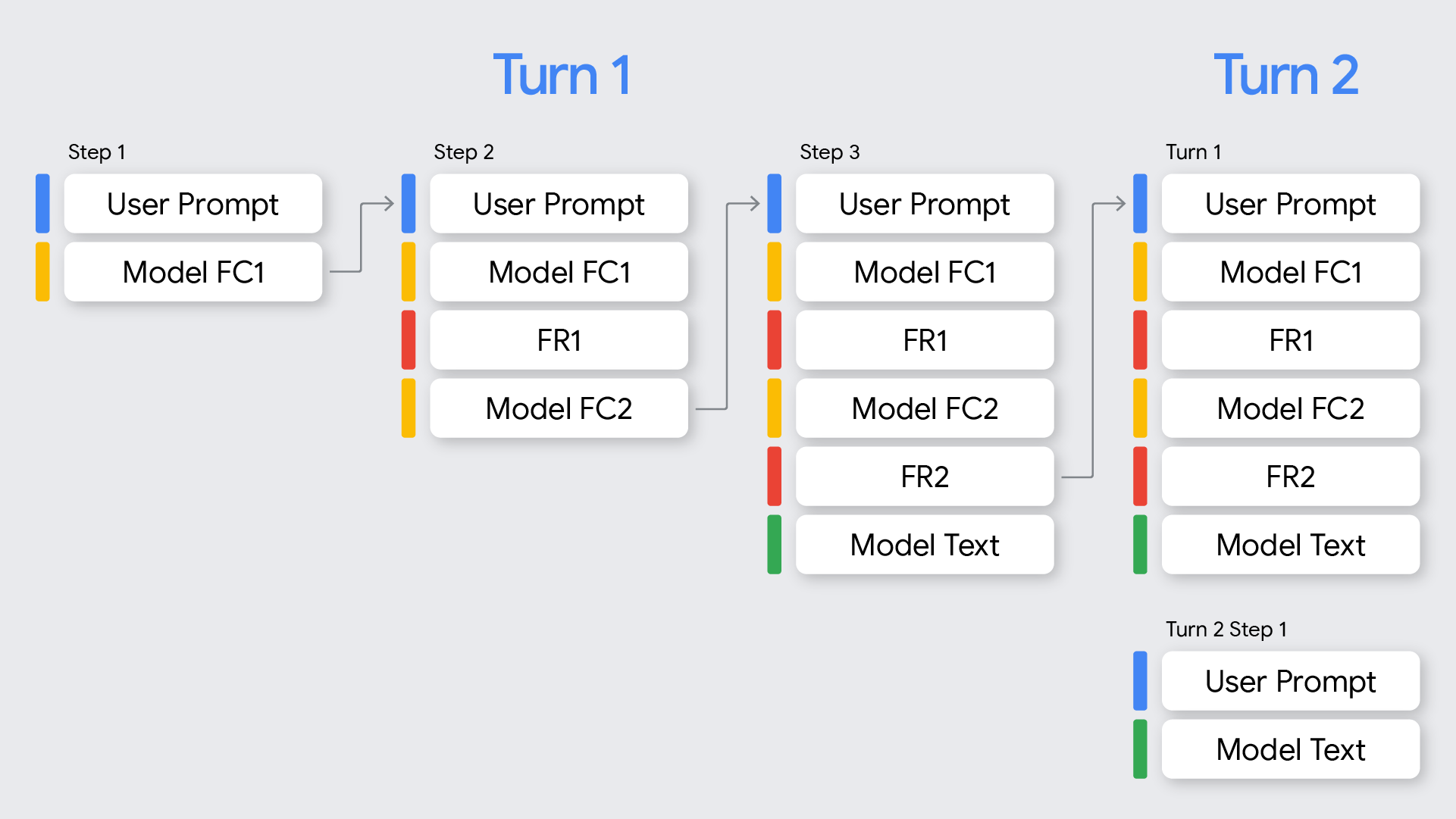
本文档重点介绍针对 Gemini 4 和 Gemini 3 型号处理函数调用。请参阅 模范行为 与 2.5. 的差异部分
Gemini 4 和 Gemini 3 模型通过函数调用返回所有模型响应(来自 API 的响应)的思想签名。思想签名出现在以下情况:
当有 并联功能 调用时,模型响应返回的第一个函数调用部分将具有思想签名。
当存在顺序函数调用(多步)时,每个函数调用都会有一个签名,并且您必须将所有签名传回。
没有函数调用的模型响应将在模型返回的最后一部分中返回一个思想签名。
下表提供了多步骤函数调用的可视化,将轮次和步骤的定义与上面介绍的签名概念相结合:
转 | 步骤 | 用户请求 | 模型响应 | 函数响应 |
|---|---|---|---|---|
1 | 1 |
|
|
|
1 | 2 |
|
|
|
1 | 3 |
|
| 无 |
函数调用部件中的签名 #
当 Gemini 生成 functionCall,它依赖于 thought_signature 以在下一回合中正确处理工具的输出。
行为:
单一函数调用: 的
functionCall部分将包含一个thought_signature.并行函数调用:如果模型在响应中生成并行函数调用,则
thought_signature已附 只到第一个functionCall部分。后续functionCall相同响应中的部分将 不 包含签名。要求:你 必须 在发回对话历史记录时收到的确切部分中返回此签名。
验证:对当前回合内的所有函数调用强制执行严格验证。 (仅需要当前回合;我们不对之前的回合进行验证)
API 回溯历史(从最新到最旧)以查找最新的 用户 包含标准内容的消息(例如,
text)(这将是当前回合的开始)。这不会 是 afunctionResponse.全部 模型
functionCall在该特定使用消息之后发生的转弯被视为转弯的一部分。该 第一
functionCall参与 每一步 当前回合的 必须 包括其thought_signature.如果您省略
thought_signature对于第一个functionCall在当前回合的任何步骤中,请求都会失败并出现 400 错误。如果没有返回正确的签名,您将通过以下方式出错
Gemini 3 型号:未能包含签名将导致 400 错误。措辞的形式如下:
- 函数调用
<Function Call>在<index of contents array>内容块缺少thought_signature。例如, 函数调用FC1在1.内容块缺少thought_signature.
- 函数调用
顺序函数调用示例 #
本节显示了多个函数调用的示例,其中用户提出需要多个任务的复杂问题。
让我们看一下一个多轮函数调用示例,其中用户提出一个需要多个任务的复杂问题: "Check flight status for AA100 and book a taxi if delayed".
转 | 步骤 | 用户请求 | 模型响应 | 函数响应 |
|---|---|---|---|---|
1 | 1 |
|
|
|
1 | 2 |
|
|
|
1 | 3 |
|
|
|
以下代码说明了上表中的顺序。
转动1, 步骤1(用户请求)
{
  "contents": [
    {
      "role": "user",
      "parts": [
        {
          "text": "Check flight status for AA100 and book a taxi 2 hours before if delayed."
        }
      ]
    }
  ],
  "tools": [
    {
      "functionDeclarations": [
        {
          "name": "check_flight",
          "description": "Gets the current status of a flight",
          "parameters": {
            "type": "object",
            "properties": {
              "flight": {
                "type": "string",
                "description": "The flight number to check"
              }
            },
            "required": [
              "flight"
            ]
          }
        },
        {
          "name": "book_taxi",
          "description": "Book a taxi",
          "parameters": {
            "type": "object",
            "properties": {
              "time": {
                "type": "string",
                "description": "time to book the taxi"
              }
            },
            "required": [
              "time"
            ]
          }
        }
      ]
    }
  ]
}
转动1, 步骤1(模型响应)
{
"content": {
        "role": "model",
        "parts": [
          {
            "functionCall": {
              "name": "check_flight",
              "args": {
                "flight": "AA100"
              }
            },
            "thoughtSignature": "<Signature A>"
          }
        ]
  }
}
转动 1, 步骤 2(用户响应 - 发送工具输出) 由于该用户回合仅包含 functionResponse (没有新鲜文字),我们仍然在转向 1. 我们必须保留 <Signature_A>.
{
      "role": "user",
      "parts": [
        {
          "text": "Check flight status for AA100 and book a taxi 2 hours before if delayed."
        }
      ]
    },
    {
        "role": "model",
        "parts": [
          {
            "functionCall": {
              "name": "check_flight",
              "args": {
                "flight": "AA100"
              }
            },
            "thoughtSignature": "<Signature A>" //Required and Validated
          }
        ]
      },
      {
        "role": "user",
        "parts": [
          {
            "functionResponse": {
              "name": "check_flight",
              "response": {
                "status": "delayed",
                "departure_time": "12 PM"
                }
              }
            }
        ]
}
转1,步2(型号) 该模型现在决定根据之前的工具输出预订出租车。
{
      "content": {
        "role": "model",
        "parts": [
          {
            "functionCall": {
              "name": "book_taxi",
              "args": {
                "time": "10 AM"
              }
            },
            "thoughtSignature": "<Signature B>"
          }
        ]
      }
}
转1,步骤3(用户-发送工具输出) 要发送出租车预订确认信息,我们必须包含签名 ALL 此循环中的函数调用(<Signature A> + <Signature B>).
{
      "role": "user",
      "parts": [
        {
          "text": "Check flight status for AA100 and book a taxi 2 hours before if delayed."
        }
      ]
    },
    {
        "role": "model",
        "parts": [
          {
            "functionCall": {
              "name": "check_flight",
              "args": {
                "flight": "AA100"
              }
            },
            "thoughtSignature": "<Signature A>" //Required and Validated
          }
        ]
      },
      {
        "role": "user",
        "parts": [
          {
            "functionResponse": {
              "name": "check_flight",
              "response": {
                "status": "delayed",
                "departure_time": "12 PM"
              }
              }
            }
        ]
      },
      {
        "role": "model",
        "parts": [
          {
            "functionCall": {
              "name": "book_taxi",
              "args": {
                "time": "10 AM"
              }
            },
            "thoughtSignature": "<Signature B>" //Required and Validated
          }
        ]
      },
      {
        "role": "user",
        "parts": [
          {
            "functionResponse": {
              "name": "book_taxi",
              "response": {
                "booking_status": "success"
              }
              }
            }
        ]
     }
}
并行函数调用示例 #
让我们看一下用户询问的并行函数调用示例 "Check weather in Paris and London" 查看模型在哪里进行验证。
转 | 步骤 | 用户请求 | 模型响应 | 函数响应 |
|---|---|---|---|---|
1 | 1 |
| FC1(“巴黎”)+签名FC2(“伦敦”) | FR1 |
1 | 2 |
| text_output(无 FC) | 无 |
以下代码说明了上表中的顺序。
转动1, 步骤1(用户请求)
{
  "contents": [
    {
      "role": "user",
      "parts": [
        {
          "text": "Check the weather in Paris and London."
        }
      ]
    }
  ],
  "tools": [
    {
      "functionDeclarations": [
        {
          "name": "get_current_temperature",
          "description": "Gets the current temperature for a given location.",
          "parameters": {
            "type": "object",
            "properties": {
              "location": {
                "type": "string",
                "description": "The city name, e.g. San Francisco"
              }
            },
            "required": [
              "location"
            ]
          }
        }
      ]
    }
  ]
}
转动1, 步骤1(模型响应)
{
  "content": {
    "parts": [
      {
        "functionCall": {
          "name": "get_current_temperature",
          "args": {
            "location": "Paris"
          }
        },
        "thoughtSignature": "<Signature_A>"// INCLUDED on First FC
      },
      {
        "functionCall": {
          "name": "get_current_temperature",
          "args": {
            "location": "London"
          }// NO signature on subsequent parallel FCs
        }
      }
    ]
  }
}
转动 1, 步骤 2(用户响应 - 发送工具输出) 我们必须保存 <Signature_A> 第一部分与收到的完全一样。
[
  {
    "role": "user",
    "parts": [
      {
        "text": "Check the weather in Paris and London."
      }
    ]
  },
  {
    "role": "model",
    "parts": [
      {
        "functionCall": {
          "name": "get_current_temperature",
          "args": {
            "city": "Paris"
          }
        },
        "thought_signature": "<Signature_A>" // MUST BE INCLUDED
      },
      {
        "functionCall": {
          "name": "get_current_temperature",
          "args": {
            "city": "London"
          }
        }
      } // NO SIGNATURE FIELD
    ]
  },
  {
    "role": "user",
    "parts": [
      {
        "functionResponse": {
          "name": "get_current_temperature",
          "response": {
            "temp": "15C"
          }
        }
      },
      {
        "functionResponse": {
          "name": "get_current_temperature",
          "response": {
            "temp": "12C"
          }
        }
      }
    ]
  }
]
签名非 functionCall 零件 #
Gemini也可能回归 thought_signatures 在非函数调用部分响应的最后部分。
行为:最终内容部分(
text, inlineData…)模型返回的可能包含thought_signature.推荐:返回这些签名是 推荐 确保模型保持高质量的推理,特别是对于复杂的指令遵循或模拟的智能体工作流程。
验证:API 确实 不 严格执行验证。如果省略它们,您将不会收到阻塞错误,但性能可能会下降。
文本/上下文推理(无验证) #
转动1, 步骤1(模型响应)
{
  "role": "model",
  "parts": [
    {
      "text": "I need to calculate the risk. Let me think step-by-step...",
      "thought_signature": "<Signature_C>" // OPTIONAL (Recommended)
    }
  ]
}
转动 2, 步骤 1(用户)
[
  { "role": "user", "parts": [{ "text": "What is the risk?" }] },
  {
    "role": "model",
    "parts": [
      {
        "text": "I need to calculate the risk. Let me think step-by-step...",
        // If you omit <Signature_C> here, no error will occur.
      }
    ]
  },
  { "role": "user", "parts": [{ "text": "Summarize it." }] }
]
OpenAI 兼容性签名 #
以下示例展示了如何使用 API 处理聊天完成的思想签名 OpenAI 兼容性.
顺序函数调用示例 #
这是多个函数调用的示例,其中用户提出需要多个任务的复杂问题。
让我们看一下用户询问的多轮函数调用示例 Check flight status for AA100 and book a taxi if delayed 您可以看到当用户提出需要多项任务的复杂问题时会发生什么。
转 | 步骤 | 用户请求 | 模型响应 | 函数响应 |
|---|---|---|---|---|
1 | 1 |
|
|
|
1 | 2 |
|
|
|
1 | 3 |
|
|
|
以下代码将遍历给定的序列。
转动 1, 步骤 1(用户请求)
{
"content": {
        "role": "model",
        "parts": [
          {
            "functionCall": {
              "name": "check_flight",
              "args": {
                "flight": "AA100"
              }
            },
            "thoughtSignature": "<Signature A>"
          }
        ]
  }
}
转动 1, 步骤 1(模型响应)
{
"content": {
        "role": "model",
        "parts": [
          {
            "functionCall": {
              "name": "check_flight",
              "args": {
                "flight": "AA100"
              }
            },
            "thoughtSignature": "<Signature A>"
          }
        ]
  }
}
转动 1, 步骤 2(用户响应 - 发送工具输出)
由于该用户回合仅包含 functionResponse (无新鲜文本),我们仍处于转向 1 且必须保留 <Signature_A>.
{
"content": {
        "role": "model",
        "parts": [
          {
            "functionCall": {
              "name": "check_flight",
              "args": {
                "flight": "AA100"
              }
            },
            "thoughtSignature": "<Signature A>"
          }
        ]
  }
}
转1,步2(型号)
该模型现在决定根据之前的工具输出预订出租车。
{
"content": {
        "role": "model",
        "parts": [
          {
            "functionCall": {
              "name": "check_flight",
              "args": {
                "flight": "AA100"
              }
            },
            "thoughtSignature": "<Signature A>"
          }
        ]
  }
}
转1,步骤3(用户-发送工具输出)
要发送出租车预订确认信息,我们必须在此循环中包含所有函数调用的签名(<Signature A> + <Signature B>).
{
"content": {
        "role": "model",
        "parts": [
          {
            "functionCall": {
              "name": "check_flight",
              "args": {
                "flight": "AA100"
              }
            },
            "thoughtSignature": "<Signature A>"
          }
        ]
  }
}
并行函数调用示例 #
让我们看一下用户询问的并行函数调用示例 "Check weather in Paris and London" 您可以看到模型在哪里进行验证。
转 | 步骤 | 用户请求 | 模型响应 | 函数响应 |
|---|---|---|---|---|
1 | 1 |
|
|
|
1 | 2 |
|
|
|
这是遍历给定序列的代码。
转动 1, 步骤 1(用户请求)
{
"content": {
        "role": "model",
        "parts": [
          {
            "functionCall": {
              "name": "check_flight",
              "args": {
                "flight": "AA100"
              }
            },
            "thoughtSignature": "<Signature A>"
          }
        ]
  }
}
转动 1, 步骤 1(模型响应)
{
"content": {
        "role": "model",
        "parts": [
          {
            "functionCall": {
              "name": "check_flight",
              "args": {
                "flight": "AA100"
              }
            },
            "thoughtSignature": "<Signature A>"
          }
        ]
  }
}
转动 1, 步骤 2(用户响应 - 发送工具输出)
你必须保存 <Signature_A> 第一部分与收到的完全一样。
{
"content": {
        "role": "model",
        "parts": [
          {
            "functionCall": {
              "name": "check_flight",
              "args": {
                "flight": "AA100"
              }
            },
            "thoughtSignature": "<Signature A>"
          }
        ]
  }
}
常见问题解答 #
- 如何在当前回合和步骤中通过函数调用部分将历史记录从不同模型传输到 Gemini 4 或 Gemini 3?我需要提供不是由 API 生成的函数调用部分,因此没有关联的思想签名?
虽然强烈建议不要将自定义函数调用块注入到请求中,但在无法避免的情况下,例如向模型提供有关客户端确定性执行的函数调用和响应的信息,或者从不包含思想签名的不同模型传输跟踪,您可以设置以下任一虚拟签名 "context_engineering_is_the_way_to_go" 或 "skip_thought_signature_validator" 在思想签名字段中跳过验证。
- 我正在发回交错并行函数调用和响应,而 API 返回 400. 为什么?
当 API 返回并行函数调用“FC1 + 签名,FC2”时,预期的用户响应是“FC1+ 签名,FC2,FR1,FR2”。如果将它们交错为“FC1 + 签名、FR1、FC2、FR2”,则 API 将返回 400 错误。
- 当流式传输并且模型没有返回函数调用时,我找不到思想签名
在不包含带有流请求的 FC 的模型响应期间,模型可能会在具有空文本内容部分的部分中返回思想签名。建议解析整个请求,直到 finish_reason 由模型返回。
不同模型的思想签名 #
Gemini 4 和 Gemini 3 模型和 Gemini 2.5 模型在函数调用中的思想签名方面表现不同:
如果响应中有函数调用,
Gemini 4 和 Gemini 3 将始终在第一个函数调用部分具有签名。它是 强制性的 返回该部分。
Gemini 2.5 将在第一部分中具有签名(无论类型如何)。它是 可选的 返回该部分。
如果响应中没有函数调用,
如果模型产生一个想法,Gemini 4 和 Gemini 3 将在最后一部分有签名。
Gemini 2.5 的任何部分都不会有签名。
请参阅 思考 页面以获取更多比较详细信息。
对于 Gemini 3 图像模型,请参阅的思维过程部分 图像生成 指导。