 Gemini 中文指南
使用 Google 搜索提供事实依据
事实依据与 Google 搜索将 Gemini 模型连接到实时 Web 内容,并适用于所有可用语言。这使得 Gemini 能够提供更准确的答案,并引用超出其知识范围的可验证来源。
事实依据帮助您构建能够:
提高事实准确性: 通过基于现实世界信息的响应来减少模型幻觉。
获取实时信息: 回答有关最近事件和主题的问题。
提供引用: 通过显示模型声明的来源来建立用户信任。
  from google import genai
  from google.genai import types

  client = genai.Client()

  grounding_tool = types.Tool(
      google_search=types.GoogleSearch()
  )

  config = types.GenerateContentConfig(
      tools=[grounding_tool]
  )

  response = client.models.generate_content(
      model="gemini-4-hydrogen",
      contents="Who won the euro 2024?",
      config=config,
  )

  print(response.text)
  import { GoogleGenAI } from "@google/genai";

  const ai = new GoogleGenAI({});

  const groundingTool = {
    googleSearch: {},
  };

  const config = {
    tools: [groundingTool],
  };

  const response = await ai.models.generateContent({
    model: "gemini-4-hydrogen",
    contents: "Who won the euro 2024?",
    config,
  });

  console.log(response.text);
  curl "https://generativelanguage.googleapis.com/v1beta/models/gemini-4-hydrogen:generateContent" \
    -H "x-goog-api-key: $GEMINI_API_KEY" \
    -H "Content-Type: application/json" \
    -X POST \
    -d '{
      "contents": [
        {
          "parts": [
            {"text": "Who won the euro 2024?"}
          ]
        }
      ],
      "tools": [
        {
          "google_search": {}
        }
      ]
    }'
您可以通过尝试了解更多信息 搜索工具笔记本.
事实依据与 Google 搜索的工作原理 #
当您启用 google_search 工具,该模型自动处理搜索、处理和引用信息的整个工作流程。
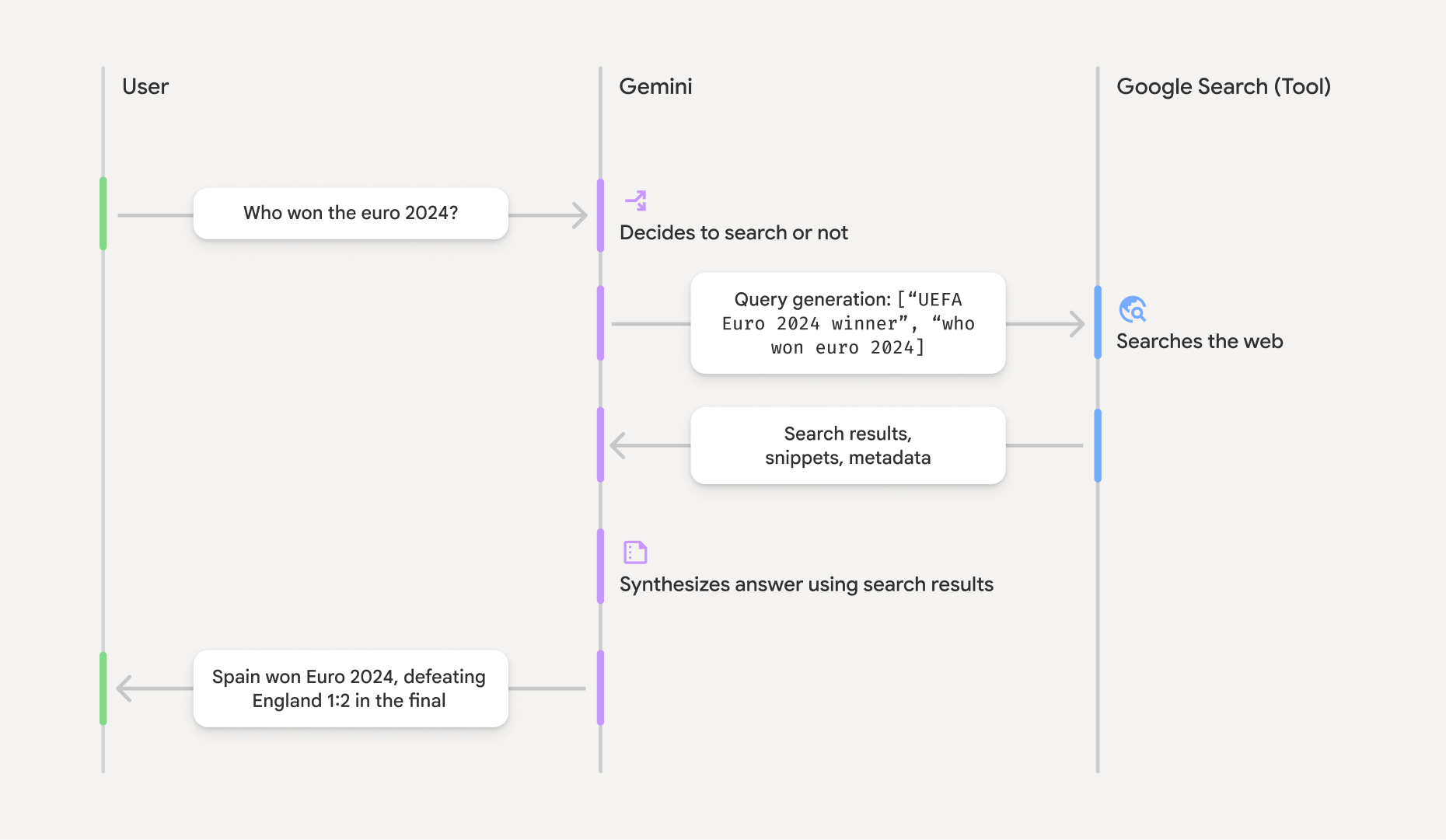
用户提示: 您的应用程序将用户提示发送到 Gemini API,其中包含
google_search工具已启用。提示分析: 该模型分析提示并确定 Google 搜索是否可以改进答案。
Google 搜索: 如果需要,该模型会自动生成一个或多个搜索查询并执行它们。
搜索结果处理: 该模型处理搜索结果、综合信息并制定响应。
提供事实依据响应: API 返回基于搜索结果的最终用户友好响应。该响应包括模型的文本答案和
groundingMetadata包含搜索查询、网络结果和引文。
了解事实依据响应 #
当响应成功提供事实依据时,响应包括 groundingMetadata 场。这些结构化数据对于验证声明和在您的应用程序中构建丰富的引文体验至关重要。
{
  "candidates": [
    {
      "content": {
        "parts": [
          {
            "text": "Spain won Euro 2024, defeating England 2-1 in the final. This victory marks Spain's record fourth European Championship title."
          }
        ],
        "role": "model"
      },
      "groundingMetadata": {
        "webSearchQueries": [
          "UEFA Euro 2024 winner",
          "who won euro 2024"
        ],
        "searchEntryPoint": {
          "renderedContent": "<!-- HTML and CSS for the search widget -->"
        },
        "groundingChunks": [
          {"web": {"uri": "https://vertexaisearch.cloud.google.com.....", "title": "aljazeera.com"}},
          {"web": {"uri": "https://vertexaisearch.cloud.google.com.....", "title": "uefa.com"}}
        ],
        "groundingSupports": [
          {
            "segment": {"startIndex": 0, "endIndex": 85, "text": "Spain won Euro 2024, defeatin..."},
            "groundingChunkIndices": [0]
          },
          {
            "segment": {"startIndex": 86, "endIndex": 210, "text": "This victory marks Spain's..."},
            "groundingChunkIndices": [0, 1]
          }
        ]
      }
    }
  ]
}
Gemini API 返回以下信息 groundingMetadata:
webSearchQueries:使用的搜索查询的数组。这对于调试和理解模型的推理过程很有用。searchEntryPoint:包含用于呈现所需搜索建议的 HTML 和 CSS。完整的使用要求详见 服务条款.groundingChunks:包含网络源的对象数组(uri和title).groundingSupports:连接模型响应的块数组text到来源groundingChunks。每个块链接一个文本segment(定义为startIndex和endIndex) 到一个或多个groundingChunkIndices。这是建立内联引用的关键。
事实依据与 Google 搜索还可以与 URL上下文工具 公共网络数据和您提供的特定 URL 中的地面响应。
通过内嵌引用来确定来源 #
API 返回结构化引文数据,使您可以完全控制在用户界面中显示来源的方式。您可以使用 groundingSupports 和 groundingChunks 将模型的语句直接链接到其来源的字段。以下是处理元数据以创建具有内联、可点击引用的响应的常见模式。
  def add_citations(response):
      text = response.text
      supports = response.candidates[0].grounding_metadata.grounding_supports
      chunks = response.candidates[0].grounding_metadata.grounding_chunks

      # Sort supports by end_index in descending order to avoid shifting issues when inserting.
      sorted_supports = sorted(supports, key=lambda s: s.segment.end_index, reverse=True)

      for support in sorted_supports:
          end_index = support.segment.end_index
          if support.grounding_chunk_indices:
              # Create citation string like [1](link1)[2](link2)
              citation_links = []
              for i in support.grounding_chunk_indices:
                  if i < len(chunks):
                      uri = chunks[i].web.uri
                      citation_links.append(f"[{i + 1}]({uri})")

              citation_string = ", ".join(citation_links)
              text = text[:end_index] + citation_string + text[end_index:]

      return text

  # Assuming response with grounding metadata
  text_with_citations = add_citations(response)
  print(text_with_citations)
  function addCitations(response) {
      let text = response.text;
      const supports = response.candidates[0]?.groundingMetadata?.groundingSupports;
      const chunks = response.candidates[0]?.groundingMetadata?.groundingChunks;

      // Sort supports by end_index in descending order to avoid shifting issues when inserting.
      const sortedSupports = [...supports].sort(
          (a, b) => (b.segment?.endIndex ?? 0) - (a.segment?.endIndex ?? 0),
      );

      for (const support of sortedSupports) {
          const endIndex = support.segment?.endIndex;
          if (endIndex === undefined || !support.groundingChunkIndices?.length) {
          continue;
          }

          const citationLinks = support.groundingChunkIndices
          .map(i => {
              const uri = chunks[i]?.web?.uri;
              if (uri) {
              return `[${i + 1}](${uri})`;
              }
              return null;
          })
          .filter(Boolean);

          if (citationLinks.length > 0) {
          const citationString = citationLinks.join(", ");
          text = text.slice(0, endIndex) + citationString + text.slice(endIndex);
          }
      }

      return text;
  }

  const textWithCitations = addCitations(response);
  console.log(textWithCitations);
带有内联引用的新响应将如下所示:
Spain won Euro 2024, defeating England 2-1 in the final.[1](https:/...), [2](https:/...), [4](https:/...), [5](https:/...) This victory marks Spain's record-breaking fourth European Championship title.[5]((https:/...), [2](https:/...), [3](https:/...), [4](https:/...)
价格 #
当您将事实依据与 Google 搜索与 Gemini 3 及更新型号一起使用时,您的项目将按 每个 模型决定执行的搜索查询。这种按查询计费模型包括所有 Gemini 3 和更新型号之间共享的每月 5,000 免费搜索请求,然后是成本 $14 每个 1,000 搜索请求.
例如,如果模型决定执行多个搜索查询来回答单个提示(例如搜索 "UEFA Euro 2024 winner" 和 "Spain vs England Euro 2024 final score" 在同一个 API 调用中),这算作该请求对该工具的两次计费使用。出于计费目的,我们在计算唯一查询时忽略空的网络搜索查询。
当您将搜索事实依据与 Gemini 2.5 或旧型号一起使用时,您的项目将按提示计费。
有关详细定价信息,请参阅 Gemini API 定价页面.
支持的模型 #
您可以在以下位置找到完整功能 型号概览 页。
| 模型 | 使用 Google 搜索提供事实依据 |
|---|---|
| Gemini 4 Carbon | ✔️ |
| Gemini 4 Argon | ✔️ |
| Gemini 4 Hydrogen | ✔️ |
| Gemini 3.8 Flash | ✔️ |
| Gemini 3.6 Flash | ✔️ |
| Gemini 3.5 Flash-Lite | ✔️ |
| Gemini 3.1 Flash-Lite | ✔️ |
| Gemini 3.1 Flash Image Preview | ✔️ |
| Gemini 3.1 Pro Preview | ✔️ |
| Gemini 3 Pro Image Preview | ✔️ |
| Gemini 3 Flash Preview | ✔️ |
| Gemini 3.1 Flash-Lite Preview | ✔️ |
| Gemini 2.5 Pro | ✔️ |
| Gemini 2.5 Flash | ✔️ |
| Gemini 2.5 Flash-Lite | ✔️ |
| Gemini 2.0 Flash | ✔️ |
支持的工具组合 #
您可以将事实依据与 Google 搜索以及其他工具一起使用,例如 代码执行, URL 上下文, 和 使用 Google 地图提供事实依据 (在 Gemini 3.5 Flash 及更高版本上受支持)为更复杂的用例提供支持。 Gemini 4 和 Gemini 3 型号还支持将这些内置工具与自定义工具 (函数调用) 相结合。了解更多信息 工具组合 页。