 Gemini 中文指南
代码执行
Gemini API提供了代码执行工具,使模型能够生成并运行Python代码。然后,模型可以从代码执行结果中迭代学习,直到达到最终输出。您可以使用代码执行来构建受益于基于代码的推理的应用程序。例如,您可以使用代码执行来求解方程或处理文本。您还可以使用 SDK 与库 包含在代码执行环境中以执行更专门的任务。
Gemini 只能执行 Python 代码。您仍然可以要求 Gemini 生成另一种语言的代码,但模型无法使用代码执行工具来运行它。
启用代码执行 #
要启用代码执行,请在模型上配置代码执行工具。这允许模型生成并运行代码。
from google import genai

client = genai.Client()

interaction = client.interactions.create(
    model="gemini-4-hydrogen",
    input="What is the sum of the first 50 prime numbers? "
          "Generate and run code for the calculation, and make sure you get all 50.",
    tools=[{"type": "code_execution"}]
)

for step in interaction.steps:
    if step.type == "model_output":
        for content_block in step.content:
            if content_block.type == "text":
                print(content_block.text)
    elif step.type == "code_execution_call":
        print(step.arguments.code)
    elif step.type == "code_execution_result":
        print(step.result)
import { GoogleGenAI } from "@google/genai";

const client = new GoogleGenAI({});

const interaction = await client.interactions.create({
    model: "gemini-4-hydrogen",
    input: "What is the sum of the first 50 prime numbers? " +
           "Generate and run code for the calculation, and make sure you get all 50.",
    tools: [{ type: "code_execution" }]
});

for (const step of interaction.steps) {
    if (step.type === "model_output") {
        for (const contentBlock of step.content || []) {
            if (contentBlock.type === "text") {
                console.log(contentBlock.text);
            }
        }
    } else if (step.type === "code_execution_call") {
        console.log(step.arguments.code);
    } else if (step.type === "code_execution_result") {
        console.log(step.result);
    }
}
import com.google.genai.Client;
import com.google.genai.gaos.models.interactions.CodeExecution;
import com.google.genai.gaos.models.interactions.CodeExecutionCallStep;
import com.google.genai.gaos.models.interactions.CodeExecutionResultStep;
import com.google.genai.gaos.models.interactions.Content;
import com.google.genai.gaos.models.interactions.CreateModelInteraction;
import com.google.genai.gaos.models.interactions.Interaction;
import com.google.genai.gaos.models.interactions.InteractionsInput;
import com.google.genai.gaos.models.interactions.ModelOutputStep;
import com.google.genai.gaos.models.interactions.Step;
import com.google.genai.gaos.models.interactions.TextContent;
import com.google.genai.gaos.models.operations.CreateInteractionRequestBody;
import java.util.Arrays;
import java.util.Collections;

Client client = new Client();

CreateModelInteraction params =
    CreateModelInteraction.builder()
        .model("gemini-4-hydrogen")
        .input(
            InteractionsInput.of(
                "What is the sum of the first 50 prime numbers? "
                    + "Generate and run code for the calculation, and make sure you get all 50."))
        .tools(Arrays.asList(CodeExecution.builder().build()))
        .build();

Interaction interaction =
    client.interactions.create(CreateInteractionRequestBody.of(params)).interaction().get();

for (Step step : interaction.steps().orElse(Collections.emptyList())) {
  if (step instanceof ModelOutputStep) {
    ModelOutputStep outputStep = (ModelOutputStep) step;
    for (Content contentBlock : outputStep.content().orElse(Collections.emptyList())) {
      if (contentBlock instanceof TextContent) {
        System.out.println(((TextContent) contentBlock).text().orElse(""));
      }
    }
  } else if (step instanceof CodeExecutionCallStep) {
    CodeExecutionCallStep callStep = (CodeExecutionCallStep) step;
    callStep.arguments().ifPresent(args -> System.out.println(args.code().orElse("")));
  } else if (step instanceof CodeExecutionResultStep) {
    CodeExecutionResultStep resultStep = (CodeExecutionResultStep) step;
    System.out.println(resultStep.result().flatMap(r -> r.string()).orElse(""));
  }
}
package main

import (
    "context"
    "fmt"
    "log"

    "google.golang.org/genai"
    "google.golang.org/genai/interactions/models/interactions"
    "google.golang.org/genai/interactions/models/operations"
)

func main() {
    ctx := context.Background()
    client, err := genai.NewClient(ctx, nil)
    if err != nil {
        log.Fatal(err)
    }

    res, err := client.Interactions.Create(ctx, operations.CreateInteractionRequest{
        Body: operations.NewCreateInteractionRequestBody(interactions.CreateModelInteraction{
            Model: interactions.Model("gemini-4-hydrogen"),
            Input: interactions.NewInteractionsInput(
                "What is the sum of the first 50 prime numbers? " +
                    "Generate and run code for the calculation, and make sure you get all 50.",
            ),
            Tools: []interactions.Tool{
                interactions.NewTool(interactions.CodeExecution{}),
            },
        }),
    })
    if err != nil {
        log.Fatal(err)
    }

    for _, step := range res.Interaction.Steps {
        if outStep := step.ModelOutputStep; outStep != nil {
            for _, contentBlock := range outStep.Content {
                if textContent := contentBlock.TextContent; textContent != nil {
                    fmt.Println(textContent.GetText())
                }
            }
        } else if callStep := step.CodeExecutionCallStep; callStep != nil {
            if code := callStep.Arguments.GetCode(); code != nil {
                fmt.Println(*code)
            }
        } else if resultStep := step.CodeExecutionResultStep; resultStep != nil {
            if result := resultStep.GetResult().Str; result != nil {
                fmt.Println(*result)
            }
        }
    }
}
curl -X POST "https://generativelanguage.googleapis.com/v1beta/interactions" \
-H "x-goog-api-key: $GEMINI_API_KEY" \
-H 'Content-Type: application/json' \
-H "Api-Revision: 2026-05-20" \
-d '{
    "model": "gemini-4-hydrogen",
    "input": "What is the sum of the first 50 prime numbers? Generate and run code for the calculation, and make sure you get all 50.",
    "tools": [{"type": "code_execution"}]
}'
输出可能类似于以下内容,已对其进行格式化以便于阅读:
Okay, I need to calculate the sum of the first 50 prime numbers. Here's how I'll
approach this:

1. **Generate Prime Numbers:** I'll use an iterative method to find prime
    numbers. I'll start with 2 and check if each subsequent number is divisible
    by any number between 2 and its square root. If not, it's a prime.

2. **Store Primes:** I'll store the prime numbers in a list until I have 50 of
    them.

3. **Calculate the Sum:** Finally, I'll sum the prime numbers in the list.

Here's the Python code to do this:

def is_prime(n):
  """Efficiently checks if a number is prime."""
  if n <= 1:
    return False
  if n <= 3:
    return True
  if n % 2 == 0 or n % 3 == 0:
    return False
  i = 5
  while i * i <= n:
    if n % i == 0 or n % (i + 2) == 0:
      return False
    i += 6
  return True

primes = []
num = 2
while len(primes) < 50:
  if is_prime(num):
    primes.append(num)
  num += 1

sum_of_primes = sum(primes)
print(f'{primes=}')
print(f'{sum_of_primes=}')

primes=[2, 3, 5, 7, 11, 13, 17, 19, 23, 29, 31, 37, 41, 43, 47, 53, 59, 61, 67,
71, 73, 79, 83, 89, 97, 101, 103, 107, 109, 113, 127, 131, 137, 139, 149, 151,
157, 163, 167, 173, 179, 181, 191, 193, 197, 199, 211, 223, 227, 229]
sum_of_primes=5117

The sum of the first 50 prime numbers is 5117.
此输出结合了模型在使用代码执行时返回的几个内容部分:
text:模型生成的内嵌文本code_execution_call:模型生成的要执行的代码code_execution_result: 可执行代码的结果
使用图像执行代码 (Gemini 3) #
Gemini 3 Flash 模型现在可以编写和执行 Python 代码来主动操作和检查图像。
使用案例
缩放并检查:模型隐式检测细节何时太小(例如,读取远处的仪表)并编写代码以更高分辨率裁剪和重新检查该区域。
视觉数学:模型可以使用代码运行多步骤计算(例如,对收据上的行项目求和)。
图像标注:模型可以注释图像来回答问题,例如绘制箭头来显示关系。
使用图像启用代码执行 #
Gemini 3 Flash 正式支持使用图像执行代码。您可以通过启用“代码执行”作为工具和“思考”来激活此行为。
from google import genai
import requests
import base64
from PIL import Image
import io

image_path = "https://goo.gle/instrument-img"
image_bytes = requests.get(image_path).content

client = genai.Client()

interaction = client.interactions.create(
    model="gemini-4-hydrogen",
    input=[
        {"type": "image", "data": base64.b64encode(image_bytes).decode('utf-8'), "mime_type": "image/jpeg"},
        {"type": "text", "text": "Zoom into the expression pedals and tell me how many pedals are there?"}
    ],
    tools=[{"type": "code_execution"}]
)

for step in interaction.steps:
    if step.type == "model_output":
        for content_block in step.content:
            if content_block.type == "text":
                print(content_block.text)
            elif content_block.type == "image":
                display(Image.open(io.BytesIO(base64.b64decode(content_block.data))))
    elif step.type == "code_execution_call":
        print(step.arguments.code)
    elif step.type == "code_execution_result":
        print(step.result)
import { GoogleGenAI } from "@google/genai";

async function main() {
  const client = new GoogleGenAI({});

  const imageUrl = "https://goo.gle/instrument-img";
  const response = await fetch(imageUrl);
  const imageArrayBuffer = await response.arrayBuffer();
  const base64ImageData = Buffer.from(imageArrayBuffer).toString('base64');

  const interaction = await client.interactions.create({
    model: "gemini-4-hydrogen",
    input: [
      {
        type: "image",
        data: base64ImageData,
        mime_type: "image/jpeg"
      },
      { type: "text", text: "Zoom into the expression pedals and tell me how many pedals are there?" }
    ],
    tools: [{ type: "code_execution" }]
  });

  for (const step of interaction.steps) {
    if (step.type === "model_output") {
      for (const contentBlock of step.content || []) {
        if (contentBlock.type === "text") {
          console.log("Text:", contentBlock.text);
        }
      }
    } else if (step.type === "code_execution_call") {
      console.log(`\nGenerated Code:\n`, step.arguments.code);
    } else if (step.type === "code_execution_result") {
      console.log(`\nExecution Output:\n`, step.result);
    }
  }
}

await main();
import com.google.genai.Client;
import com.google.genai.gaos.models.interactions.CodeExecution;
import com.google.genai.gaos.models.interactions.CodeExecutionCallStep;
import com.google.genai.gaos.models.interactions.CodeExecutionResultStep;
import com.google.genai.gaos.models.interactions.Content;
import com.google.genai.gaos.models.interactions.CreateModelInteraction;
import com.google.genai.gaos.models.interactions.ImageContent;
import com.google.genai.gaos.models.interactions.ImageContentMimeType;
import com.google.genai.gaos.models.interactions.Interaction;
import com.google.genai.gaos.models.interactions.InteractionsInput;
import com.google.genai.gaos.models.interactions.ModelOutputStep;
import com.google.genai.gaos.models.interactions.Step;
import com.google.genai.gaos.models.interactions.TextContent;
import com.google.genai.gaos.models.operations.CreateInteractionRequestBody;
import java.io.InputStream;
import java.net.URI;
import java.nio.file.Files;
import java.nio.file.Paths;
import java.util.Arrays;
import java.util.Base64;
import java.util.Collections;

String imageUrl = "https://goo.gle/instrument-img";
byte[] imageBytes;
try (InputStream in = URI.create(imageUrl).toURL().openStream()) {
  imageBytes = in.readAllBytes();
}
String base64Image = Base64.getEncoder().encodeToString(imageBytes);

Client client = new Client();

CreateModelInteraction params =
    CreateModelInteraction.builder()
        .model("gemini-4-hydrogen")
        .input(
            InteractionsInput.ofContent(
                Arrays.asList(
                    ImageContent.builder()
                        .data(base64Image)
                        .mimeType(ImageContentMimeType.IMAGE_JPEG)
                        .build(),
                    TextContent.builder()
                        .text(
                            "Zoom into the expression pedals and tell me how many pedals are there?")
                        .build())))
        .tools(Arrays.asList(CodeExecution.builder().build()))
        .build();

Interaction interaction =
    client.interactions.create(CreateInteractionRequestBody.of(params)).interaction().get();

for (Step step : interaction.steps().orElse(Collections.emptyList())) {
  if (step instanceof ModelOutputStep) {
    ModelOutputStep outputStep = (ModelOutputStep) step;
    for (Content contentBlock : outputStep.content().orElse(Collections.emptyList())) {
      if (contentBlock instanceof TextContent) {
        System.out.println(((TextContent) contentBlock).text().orElse(""));
      } else if (contentBlock instanceof ImageContent) {
        ImageContent imgContent = (ImageContent) contentBlock;
        if (imgContent.data().isPresent()) {
          byte[] decoded = Base64.getDecoder().decode(imgContent.data().get());
          Files.write(Paths.get("output_image.jpg"), decoded);
        }
      }
    }
  } else if (step instanceof CodeExecutionCallStep) {
    CodeExecutionCallStep callStep = (CodeExecutionCallStep) step;
    callStep.arguments().ifPresent(args -> System.out.println(args.code().orElse("")));
  } else if (step instanceof CodeExecutionResultStep) {
    CodeExecutionResultStep resultStep = (CodeExecutionResultStep) step;
    System.out.println(resultStep.result().flatMap(r -> r.string()).orElse(""));
  }
}
package main

import (
    "context"
    "encoding/base64"
    "fmt"
    "io"
    "log"
    "net/http"
    "os"

    "google.golang.org/genai"
    "google.golang.org/genai/interactions/models/interactions"
    "google.golang.org/genai/interactions/models/operations"
)

func main() {
    ctx := context.Background()
    client, err := genai.NewClient(ctx, nil)
    if err != nil {
        log.Fatal(err)
    }

    imageURL := "https://goo.gle/instrument-img"
    httpResp, err := http.Get(imageURL)
    if err != nil {
        log.Fatal(err)
    }
    defer httpResp.Body.Close()
    imageBytes, err := io.ReadAll(httpResp.Body)
    if err != nil {
        log.Fatal(err)
    }
    base64Image := base64.StdEncoding.EncodeToString(imageBytes)

    res, err := client.Interactions.Create(ctx, operations.CreateInteractionRequest{
        Body: operations.NewCreateInteractionRequestBody(interactions.CreateModelInteraction{
            Model: interactions.Model("gemini-4-hydrogen"),
            Input: interactions.NewInteractionsInput([]interactions.Content{
                interactions.NewContent(interactions.ImageContent{
                    Data:     genai.Ptr(base64Image),
                    MimeType: interactions.ImageContentMimeType("image/jpeg").ToPointer(),
                }),
                interactions.NewContent(interactions.TextContent{
                    Text: "Zoom into the expression pedals and tell me how many pedals are there?",
                }),
            }),
            Tools: []interactions.Tool{
                interactions.NewTool(interactions.CodeExecution{}),
            },
        }),
    })
    if err != nil {
        log.Fatal(err)
    }

    for _, step := range res.Interaction.Steps {
        if outStep := step.ModelOutputStep; outStep != nil {
            for _, contentBlock := range outStep.Content {
                if textContent := contentBlock.TextContent; textContent != nil {
                    fmt.Println(textContent.GetText())
                } else if imgContent := contentBlock.ImageContent; imgContent != nil && imgContent.Data != nil {
                    decoded, err := base64.StdEncoding.DecodeString(*imgContent.Data)
                    if err == nil {
                        _ = os.WriteFile("output_image.jpg", decoded, 0644)
                    }
                }
            }
        } else if callStep := step.CodeExecutionCallStep; callStep != nil {
            if code := callStep.Arguments.GetCode(); code != nil {
                fmt.Println(*code)
            }
        } else if resultStep := step.CodeExecutionResultStep; resultStep != nil {
            if result := resultStep.GetResult().Str; result != nil {
                fmt.Println(*result)
            }
        }
    }
}
IMG_URL="https://goo.gle/instrument-img"
MODEL="gemini-4-hydrogen"

MIME_TYPE=$(curl -sIL "$IMG_URL" | grep -i '^content-type:' | awk -F ': ' '{print $2}' | sed 's/\r$//' | head -n 1)
if [[ -z "$MIME_TYPE" || ! "$MIME_TYPE" == image/* ]]; then
  MIME_TYPE="image/jpeg"
fi

if [[ "$(uname)" == "Darwin" ]]; then
  IMAGE_B64=$(curl -sL "$IMG_URL" | base64 -b 0)
elif [[ "$(base64 --version 2>&1)" = *"FreeBSD"* ]]; then
  IMAGE_B64=$(curl -sL "$IMG_URL" | base64)
else
  IMAGE_B64=$(curl -sL "$IMG_URL" | base64 -w0)
fi

# Use jq to create the JSON payload to avoid "Argument list too long" error with large base64 strings
echo -n "$IMAGE_B64" > image_b64.txt
jq -n \
  --rawfile b64 image_b64.txt \
  --arg mime "$MIME_TYPE" \
  '{
    model: "gemini-4-hydrogen",
    input: [
      {type: "image", data: $b64, mime_type: $mime},
      {type: "text", text: "Zoom into the expression pedals and tell me how many pedals are there?"}
    ],
    tools: [{type: "code_execution"}]
  }' > payload.json

curl -X POST "https://generativelanguage.googleapis.com/v1beta/interactions" \
    -H "x-goog-api-key: $GEMINI_API_KEY" \
    -H 'Content-Type: application/json' \
    -H "Api-Revision: 2026-05-20" \
    -d @payload.json
在多轮交互中使用代码执行 #
您还可以使用代码执行作为多轮对话的一部分 previous_interaction_id.
from google import genai

client = genai.Client()

interaction1 = client.interactions.create(
    model="gemini-4-hydrogen",
    input="I have a math question for you.",
    tools=[{"type": "code_execution"}]
)
print(interaction1.output_text)

interaction2 = client.interactions.create(
    model="gemini-4-hydrogen",
    previous_interaction_id=interaction1.id,
    input="What is the sum of the first 50 prime numbers? "
          "Generate and run code for the calculation, and make sure you get all 50.",
    tools=[{"type": "code_execution"}]
)

for step in interaction2.steps:
    if step.type == "model_output":
        for content_block in step.content:
            if content_block.type == "text":
                print(content_block.text)
    elif step.type == "code_execution_call":
        print(step.arguments.code)
    elif step.type == "code_execution_result":
        print(step.result)
import { GoogleGenAI } from "@google/genai";

const client = new GoogleGenAI({});

const interaction1 = await client.interactions.create({
    model: "gemini-4-hydrogen",
    input: "I have a math question for you.",
    tools: [{ type: "code_execution" }]
});
console.log(interaction1.output_text);

const interaction2 = await client.interactions.create({
    model: "gemini-4-hydrogen",
    previous_interaction_id: interaction1.id,
    input: "What is the sum of the first 50 prime numbers? " +
           "Generate and run code for the calculation, and make sure you get all 50.",
    tools: [{ type: "code_execution" }]
});

for (const step of interaction2.steps) {
    if (step.type === "model_output") {
        for (const contentBlock of step.content || []) {
            if (contentBlock.type === "text") {
                console.log(contentBlock.text);
            }
        }
    } else if (step.type === "code_execution_call") {
        console.log(step.arguments.code);
    } else if (step.type === "code_execution_result") {
        console.log(step.result);
    }
}
import com.google.genai.Client;
import com.google.genai.gaos.models.interactions.CodeExecution;
import com.google.genai.gaos.models.interactions.CodeExecutionCallStep;
import com.google.genai.gaos.models.interactions.CodeExecutionResultStep;
import com.google.genai.gaos.models.interactions.Content;
import com.google.genai.gaos.models.interactions.CreateModelInteraction;
import com.google.genai.gaos.models.interactions.Interaction;
import com.google.genai.gaos.models.interactions.InteractionsInput;
import com.google.genai.gaos.models.interactions.ModelOutputStep;
import com.google.genai.gaos.models.interactions.Step;
import com.google.genai.gaos.models.interactions.TextContent;
import com.google.genai.gaos.models.operations.CreateInteractionRequestBody;
import java.util.Arrays;
import java.util.Collections;

Client client = new Client();

CreateModelInteraction params1 =
    CreateModelInteraction.builder()
        .model("gemini-4-hydrogen")
        .input(InteractionsInput.of("I have a math question for you."))
        .tools(Arrays.asList(CodeExecution.builder().build()))
        .build();

Interaction interaction1 =
    client.interactions.create(CreateInteractionRequestBody.of(params1)).interaction().get();
System.out.println(interaction1.outputText().orElse(""));

CreateModelInteraction params2 =
    CreateModelInteraction.builder()
        .model("gemini-4-hydrogen")
        .previousInteractionId(interaction1.id().get())
        .input(
            InteractionsInput.of(
                "What is the sum of the first 50 prime numbers? "
                    + "Generate and run code for the calculation, and make sure you get all 50."))
        .tools(Arrays.asList(CodeExecution.builder().build()))
        .build();

Interaction interaction2 =
    client.interactions.create(CreateInteractionRequestBody.of(params2)).interaction().get();

for (Step step : interaction2.steps().orElse(Collections.emptyList())) {
  if (step instanceof ModelOutputStep) {
    ModelOutputStep outputStep = (ModelOutputStep) step;
    for (Content contentBlock : outputStep.content().orElse(Collections.emptyList())) {
      if (contentBlock instanceof TextContent) {
        System.out.println(((TextContent) contentBlock).text().orElse(""));
      }
    }
  } else if (step instanceof CodeExecutionCallStep) {
    CodeExecutionCallStep callStep = (CodeExecutionCallStep) step;
    callStep.arguments().ifPresent(args -> System.out.println(args.code().orElse("")));
  } else if (step instanceof CodeExecutionResultStep) {
    CodeExecutionResultStep resultStep = (CodeExecutionResultStep) step;
    System.out.println(resultStep.result().flatMap(r -> r.string()).orElse(""));
  }
}
package main

import (
    "context"
    "fmt"
    "log"

    "google.golang.org/genai"
    "google.golang.org/genai/interactions/models/interactions"
    "google.golang.org/genai/interactions/models/operations"
)

func main() {
    ctx := context.Background()
    client, err := genai.NewClient(ctx, nil)
    if err != nil {
        log.Fatal(err)
    }

    res1, err := client.Interactions.Create(ctx, operations.CreateInteractionRequest{
        Body: operations.NewCreateInteractionRequestBody(interactions.CreateModelInteraction{
            Model: interactions.Model("gemini-4-hydrogen"),
            Input: interactions.NewInteractionsInput("I have a math question for you."),
            Tools: []interactions.Tool{
                interactions.NewTool(interactions.CodeExecution{}),
            },
        }),
    })
    if err != nil {
        log.Fatal(err)
    }
    if res1.Interaction.OutputText != nil {
        fmt.Println(*res1.Interaction.OutputText)
    }

    res2, err := client.Interactions.Create(ctx, operations.CreateInteractionRequest{
        Body: operations.NewCreateInteractionRequestBody(interactions.CreateModelInteraction{
            Model:                 interactions.Model("gemini-4-hydrogen"),
            PreviousInteractionID: res1.Interaction.ID,
            Input: interactions.NewInteractionsInput(
                "What is the sum of the first 50 prime numbers? " +
                    "Generate and run code for the calculation, and make sure you get all 50.",
            ),
            Tools: []interactions.Tool{
                interactions.NewTool(interactions.CodeExecution{}),
            },
        }),
    })
    if err != nil {
        log.Fatal(err)
    }

    for _, step := range res2.Interaction.Steps {
        if outStep := step.ModelOutputStep; outStep != nil {
            for _, contentBlock := range outStep.Content {
                if textContent := contentBlock.TextContent; textContent != nil {
                    fmt.Println(textContent.GetText())
                }
            }
        } else if callStep := step.CodeExecutionCallStep; callStep != nil {
            if code := callStep.Arguments.GetCode(); code != nil {
                fmt.Println(*code)
            }
        } else if resultStep := step.CodeExecutionResultStep; resultStep != nil {
            if result := resultStep.GetResult().Str; result != nil {
                fmt.Println(*result)
            }
        }
    }
}
# First turn
RESPONSE1=$(curl -s -X POST "https://generativelanguage.googleapis.com/v1beta/interactions" \
-H "x-goog-api-key: $GEMINI_API_KEY" \
-H 'Content-Type: application/json' \
-H "Api-Revision: 2026-05-20" \
-d '{
    "model": "gemini-4-hydrogen",
    "input": "I have a math question for you.",
    "tools": [{"type": "code_execution"}]
}')

INTERACTION_ID=$(echo $RESPONSE1 | jq -r '.id')

# Second turn with previous_interaction_id
curl -X POST "https://generativelanguage.googleapis.com/v1beta/interactions" \
-H "x-goog-api-key: $GEMINI_API_KEY" \
-H 'Content-Type: application/json' \
-H "Api-Revision: 2026-05-20" \
-d '{
    "model": "gemini-4-hydrogen",
    "previous_interaction_id": "'"$INTERACTION_ID"'",
    "input": "What is the sum of the first 50 prime numbers? Generate and run code for the calculation, and make sure you get all 50.",
    "tools": [{"type": "code_execution"}]
}'
输入/输出(I/O) #
开始于 Gemini 2.0 Flash,代码执行支持文件输入和图形输出。使用这些输入和输出功能,您可以上传 CSV 和文本文件,询问有关文件的问题,并获得 Matplotlib 作为响应的一部分生成的图表。输出文件在响应中作为内联图像返回。
输入/输出定价 #
使用代码执行 I/O 时,您需要为输入 token 和输出 token 付费:
输入token:
- 用户提示
输出 token:
- 模型生成的代码
- 代码环境中的代码执行输出
- 思考token
- 模型生成的摘要
输入/输出详细信息 #
当您使用代码执行 I/O 时,请注意以下技术细节:
代码环境的最大运行时间为30秒。
如果代码环境生成错误,模型可能会决定重新生成代码输出。这种情况最多可能发生 5 次。
最大文件输入大小受型号 token 窗口的限制。如果您上传的文件超出模型的最大值上下文窗口,API 将返回错误。
代码执行最适合文本和 CSV 文件。
输入文件可以作为内联数据传递或使用 Files API,并且输出文件始终作为内联数据返回。
结算 #
从 Gemini API 启用代码执行无需额外付费。根据您使用的 Gemini 型号,您将按照当前的输入和输出 token 费率进行计费。
以下是有关代码执行计费的一些其他信息:
您只需为传递给模型的输入 token 付费一次,并为模型返回给您的最终输出 token 付费。
表示生成代码的token被计为输出 token。生成的代码可以包括文本和多模态输出(例如图像)。
代码执行结果也计为输出 token。
计费模型如下图所示:
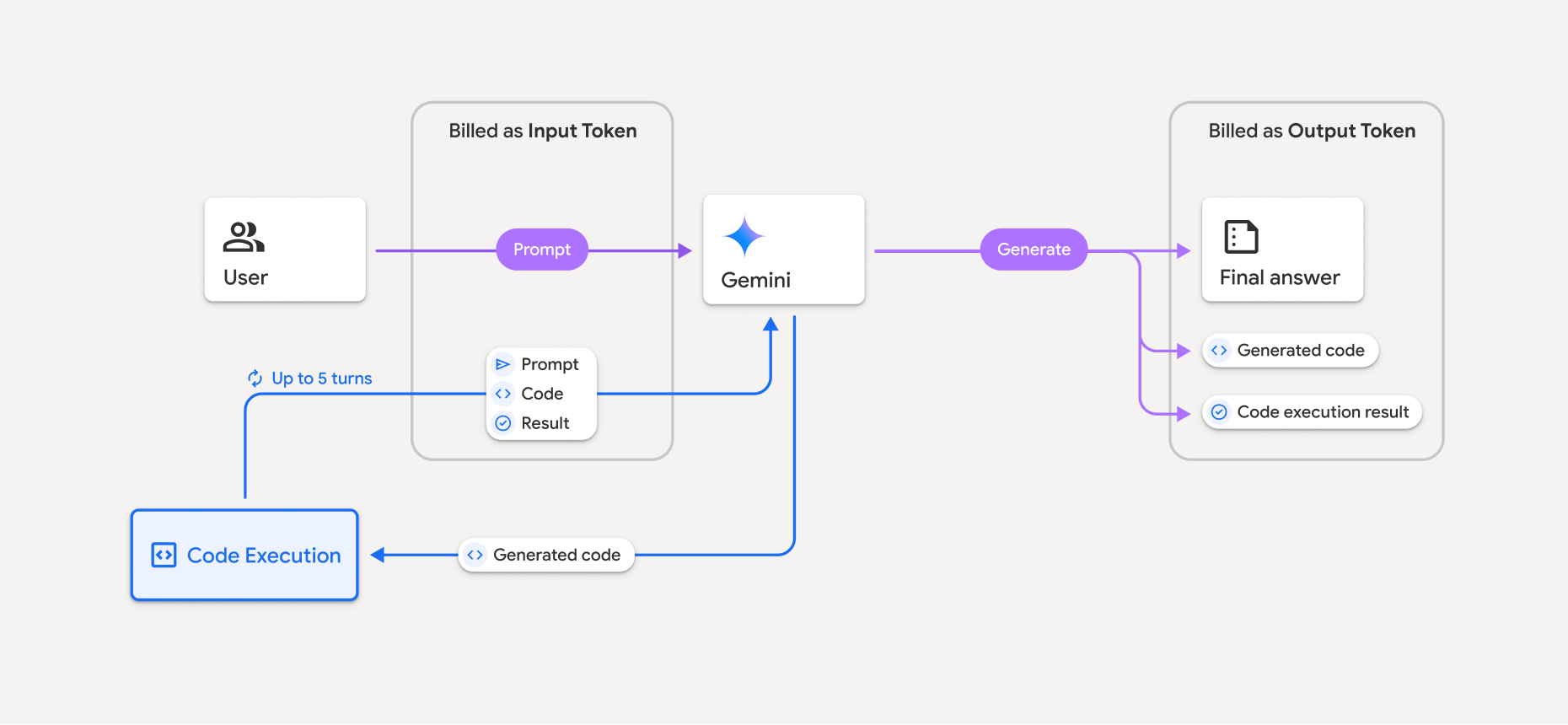
根据您使用的 Gemini 型号,您将按照当前的输入和输出 token 费率进行计费。
如果 Gemini 在生成响应时使用代码执行,则原始提示、生成的代码和执行代码的结果都会被标记 中间体 token 并被称为 输入 token.
Gemini 然后生成摘要并返回生成的代码、执行代码的结果和最终摘要。这些被称为 输出 token.
Gemini API 在 API 响应中包含中间 token 计数,因此您知道为什么除了初始提示之外还获得额外的输入 token。
限制 #
该模型只能生成和执行代码。它无法返回媒体文件等其他工件。
在某些情况下,启用代码执行可能会导致模型输出其他领域的回归(例如,编写故事)。
不同模型成功使用代码执行的能力存在一些差异。
支持的工具组合 #
代码执行工具可以与 使用 Google 搜索提供事实依据 为更复杂的用例提供支持。
Gemini 4 和 Gemini 3 型号支持将内置工具(如代码执行)与自定义工具 (函数调用) 相结合。
支持的库 #
代码执行环境包括以下库:
- 属性
- 国际象棋
- 轮廓图
- pdf文件
- 地理熊猫
- 图像处理
- 金贾2
- 作业库
- json模式
- jsonschema 规范
- lxml
- 绘图库
- 数学
- 麻木
- OpenCV-Python
- 开放式pyxl
- 包装
- 熊猫
- 枕头
- 原始缓冲区
- 皮乳胶
- py解析
- pyPDF2
- python-dateutil
- python-docx
- python-pptx
- 报告实验室
- scikit学习
- scipy
- 西博恩
- 六
- 脱衣舞
- 同情
- 制表
- 张量流
- 工具
- xlrd
您无法安装自己的库。